SDK 集成
iOS SDK 以包含源代码的模块形式提供。
步骤 1. 启用库
要连接分析库,请将以下依赖项添加到项目的 Podfile 中:
pod 'AppMetricaAnalytics', '~> 6.6.0'
我有一个儿童应用
如果您的应用针对儿童,请连接不使用AppMetricaAdSupport的模块:
pod 'AppMetricaCore', '~> 6.6.0'
pod 'AppMetricaCrashes', '~> 6.6.0'
pod 'AppMetricaWebKit', '~> 6.6.0'
我不需要所有功能
如果您不需要 AppMetrica SDK 的所有功能,只连接必要的模块:
pod 'AppMetricaCore', '~> 6.6.0' # The main module for working with the AppMetrica SDK, mandatory for connection
pod 'AppMetricaAdSupport', '~> 6.6.0' # Required for collecting IDs. IDFAs won't be collected without it
pod 'AppMetricaCrashes', '~> 6.6.0' # The module for detecting crashes and sending errors
pod 'AppMetricaWebKit', '~> 6.6.0' # The module for setting up event sending from the WebView's JS code
通过Xcode界面进行集成
要连接库,请执行以下步骤:
-
在 Xcode 项目导航器 (项目导航器) 窗口中,选择您的项目(如果使用 工作区)。 在顶部菜单中,点击文件,然后选择添加包依赖...。
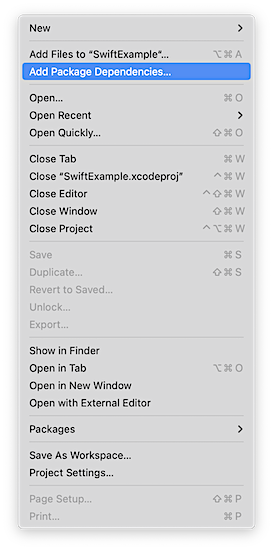
-
指定仓库 URL
https://github.com/appmetrica/appmetrica-sdk-ios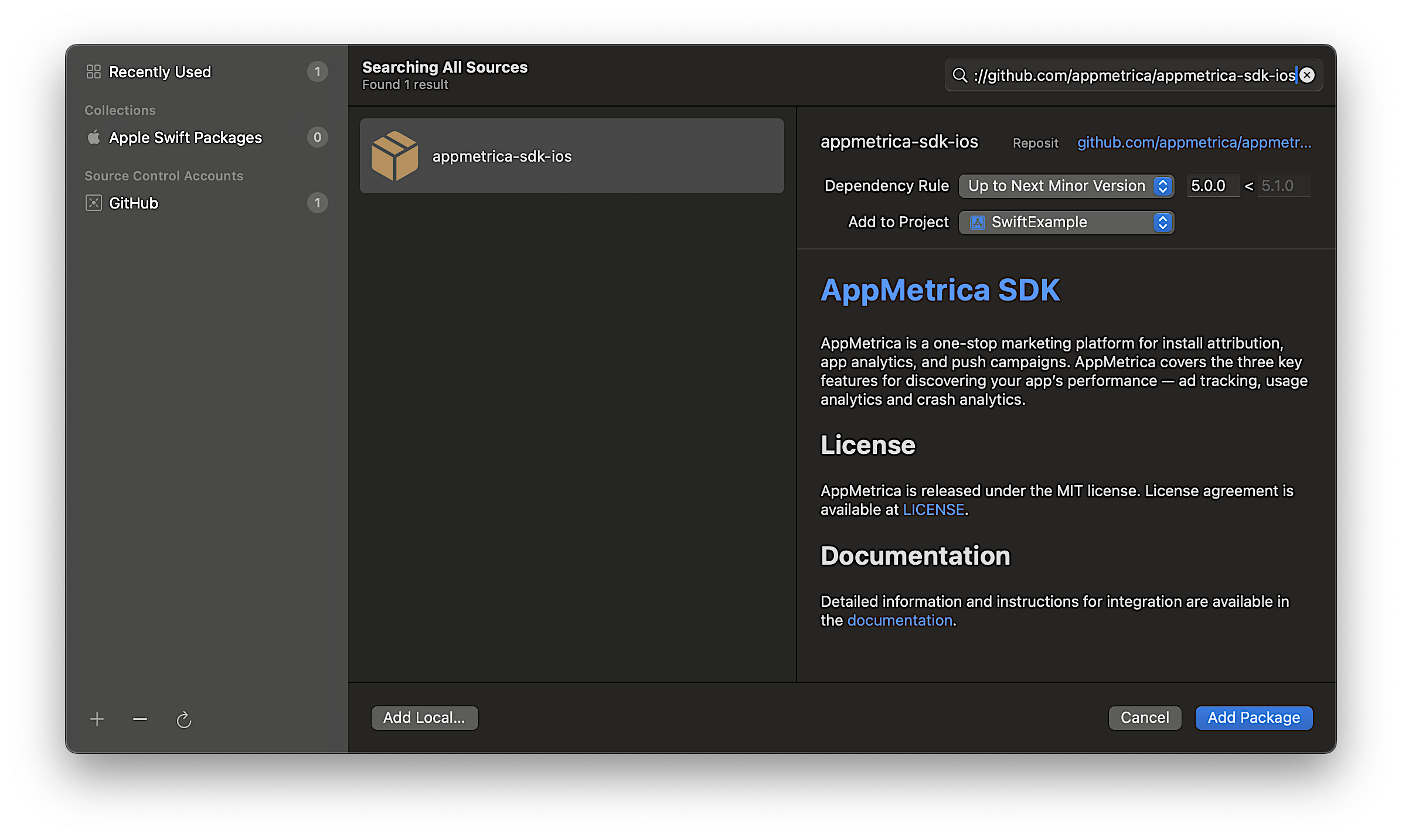
-
只保留需要的模块(要禁用模块,请在“添加到目标”中选择
无):``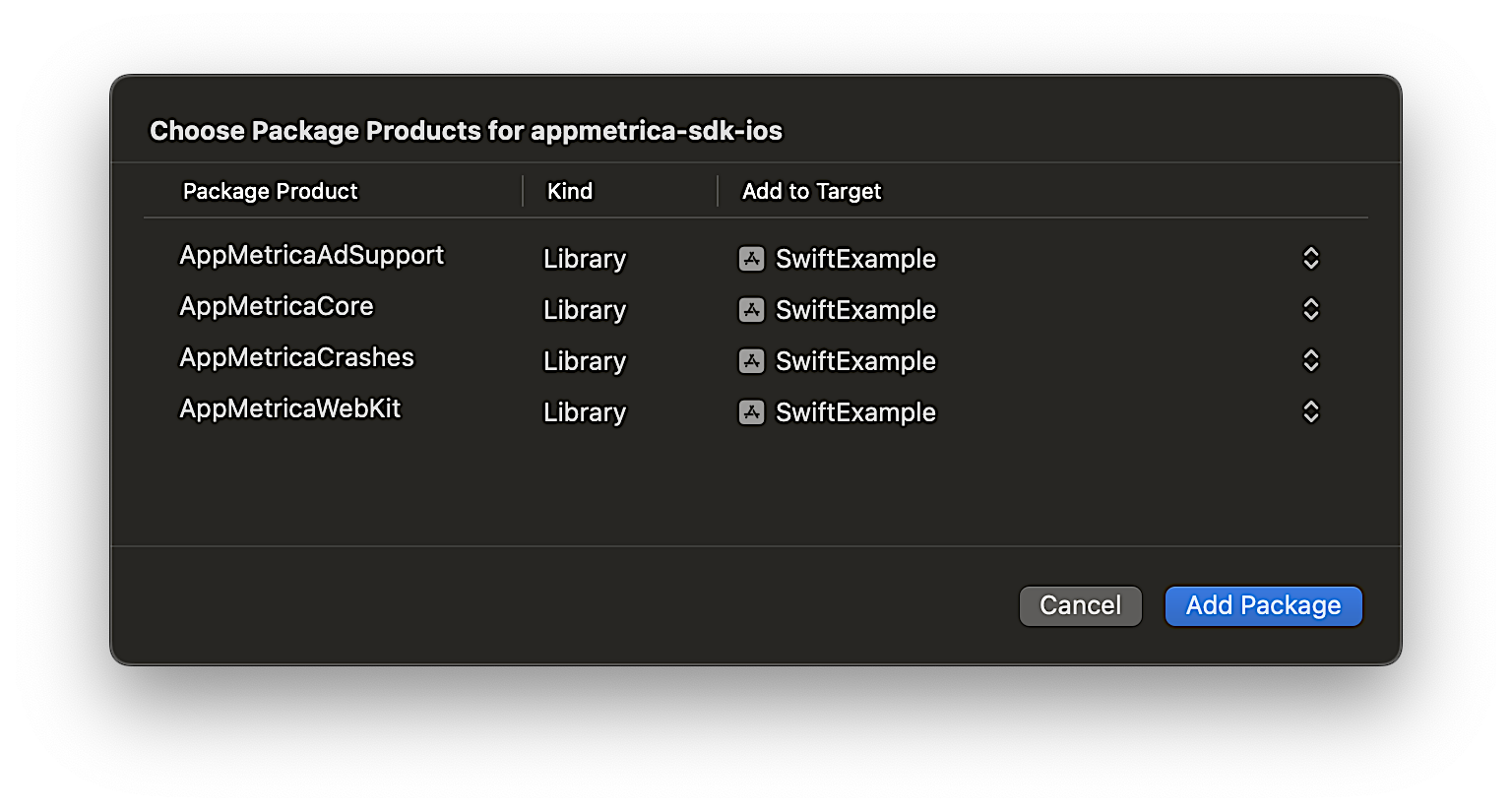
AppMetricaCore:必需的主要 SDK 模块。 它必须连接才能使用 AppMetrica。AppMetricaAdSupport:该模块用于收集ID,包括IDFA。AppMetrica崩溃:该模块用于检测崩溃并发送错误。AppMetricaWebKit:该模块允许您从WebView中的JavaScript代码发送事件。
备注
如果您的应用针对儿童,请连接不使用
AppMetricaAdSupport的模块。
通过 Package.swift 清单进行集成
首先,将以下依赖项添加到你的包的 dependencies: 数组中:
dependencies: [
   .package(
      url: "https://github.com/appmetrica/appmetrica-sdk-ios",
      from: "6.6.0"
   )
],
您可以根据项目需求连接的 AppMetrica SDK 模块:
AppMetricaCore:必需的主要 SDK 模块。 它必须连接才能使用 AppMetrica。AppMetricaAdSupport:该模块用于收集ID,包括IDFA。AppMetrica崩溃:该模块用于检测崩溃并发送错误。AppMetricaWebKit:该模块允许您从WebView中的JavaScript代码发送事件。
备注
如果您的应用针对儿童,请连接不使用AppMetricaAdSupport的模块。
示例:在目标的 dependencies 数组中连接模块
.target(
   name: "MyTargetName",
   dependencies: [
      .product(name: "AppMetricaCore", package: "AppMetrica"),
      .product(name: "AppMetricaCrashes", package: "AppMetrica"),
      .product(name: "AppMetricaWebKit", package: "AppMetrica"),
      // .product(name: "AppMetricaAdSupport", package: "AppMetrica"), // This module is disabled
   ]
),
通过 Tuist 与 Package.swift 清单集成
将AppMetrica添加到你的Tuist/Package.swift
import PackageDescription

#if TUIST
    import struct ProjectDescription.PackageSettings

    let packageSettings = PackageSettings(
        productTypes: [:]
    )
#endif

let package = Package(
    name: "NewTuist",
    dependencies: [
        .package(url: "https://github.com/appmetrica/appmetrica-sdk-ios", from: "5.0.0")
    ]
)
现在在 Project.swift 中为 target 添加依赖。
AppMetrica 需要 "-ObjC" 链接器标志。 为所有与 AppMetrica 静态链接的目标添加设置,例如:
依赖项: [
    .external(name: "AppMetricaCore"),
],
设置: .settings(
   基础: ["OTHER_LDFLAGS": "$(inherited) -ObjC"]
)
步骤 2. 初始化库
添加导入:
import AppMetricaCore
在你的 application(_:didFinishLaunchingWithOptions:) 方法中初始化库:UIApplicationDelegate
func application(_ application: UIApplication, didFinishLaunchingWithOptions launchOptions: [UIApplication.LaunchOptionsKey : Any]? = nil) -> Bool {
    // Initializing the AppMetrica SDK.
    let configuration = AppMetricaConfiguration(apiKey: "API key")
    AppMetrica.activate(with: configuration!)
}
添加导入:
#import <AppMetricaCore/AppMetricaCore.h>
在您的 application:didFinishLaunchingWithOptions: 方法中初始化库:UIApplicationDelegate
- (BOOL)application:(UIApplication *)application didFinishLaunchingWithOptions:(NSDictionary *)launchOptions
{
    // Initializing the AppMetrica SDK.
    AMAAppMetricaConfiguration *configuration = [[AMAAppMetricaConfiguration alloc] initWithAPIKey:@"API key"];
    [AMAAppMetrica activateWithConfiguration:configuration];
    return YES;
}
什么是 API 密钥?
API 密钥是在AppMetrica网页界面进行应用注册时分配的唯一应用 ID。 你可以在 设置 → 主页 中找到它。
AppMetrica 支持跟踪预安装的应用。 要了解更多信息,请参见跟踪预安装应用。
步骤 3. (可选) 配置事件发送、用户属性和收入
-
要收集用户在应用中的操作信息,请设置发送自定义事件。 要了解更多信息,请参见发送自定义事件。
-
要收集用户信息,请设置发送用户属性。 要了解更多信息,请查看用户配置文件。
备注
与事件不同,个人资料属性只能有一个值。 当您发送新的属性值时,旧的值会被覆盖。
-
要跟踪应用内购买,请设置收入发送。 要了解更多信息,请查看应用内购买。
第 4 步。 测试库的操作
要测试库的功能:
- 启动包含 AppMetrica SDK 的应用,并使用一段时间。
- 确保您的设备已连接到互联网。
- 在 AppMetrica 界面中,请确保:
了解更多
故障排查
如果您没有找到所需答案,可以通过反馈表单提交您的问题。 请尽可能详细地描述问题。 如果可能,请附上截图。